Stream Recasting
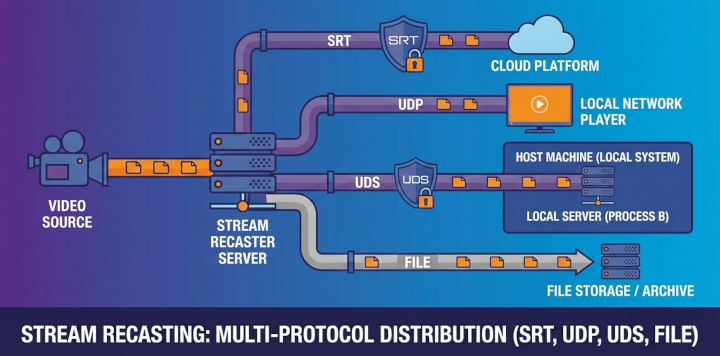
SkyView supports stream playback in the browser. With the Recast capability, it can also forward streams, publish them to RTSP clients, extract H.264 SEI metadata, or stream files over the network.
Modes
Choose a mode for each stream. The active license determines whether recasting is available.
💻 Play (Player Mode)
Use this mode when you only need stream playback.
- Receive streams and play them via WebRTC.
- Stream activation and lifecycle are controlled by the backend, independently of open browser players.
- No recast targets are available.
📡 Recast (Recast Mode)
Use this mode when the playback is not required.
- Receive or generate streams and forward them to one or more targets.
- Playback (WebRTC) is not required.
- Multiple targets per stream are supported, including UDP, UDS, SRT, and RTSP Server.
💻 📡 Play and Recast (Recast Mode with Playback)
Use this mode when you want to view the stream and forward it at the same time.
- WebRTC playback continues as usual.
- One or more recast targets can be added per stream.
- Playback and recast are configured independently.
Notes
- Recast controls are available only when the license includes the Recast option.
- The backend enforces license limits, the UI may hide or disable recast options when not licensed.
PCAP replay targets
PCAP and PCAPNG sources replay the UDP payloads from the selected captured flow with the capture's original timing. In Recast or Play and Recast mode, the source can feed multiple UDP, UDS, and SRT outputs.
For UDP outputs, choose one of these destination modes:
- Captured destination resolves automatically to the destination IP and port stored in the selected capture flow.
- Custom destination sends the same payloads to a configured UDP URL. Add more output targets to fan out to several destinations.
Captured-destination replay uses the operating system's normal UDP stack. It preserves the UDP payload and destination, but it does not reproduce the original source address, Ethernet headers, VLAN, DSCP, TTL, or packet checksums.
For link-layer test replay, add a Raw PCAP target. It preserves original Ethernet frames or rewrites only the destination MAC, IPv4 address, and UDP port. Raw injection has additional capture-format, interface, privilege, MTU, and spoofing requirements described in Raw PCAP replay.
H.264 SEI recasting
UDP targets can extract metadata from H.264 video and send each matching message as a binary UDP datagram using Payload → H.264 SEI metadata. See H.264 SEI recasting for target configuration, UUID filtering, binary format, supported sources, and status indicators.
RTSP server
Use an RTSP Server target to let external clients receive live streams or play files independently. Both MPEG-TS and separate RTP tracks are available. See RTSP server targets for setup, authentication, file controls, and server settings.