H.264 SEI recasting
H.264 SEI recasting extracts metadata embedded in an H.264 video stream and forwards it to a UDP receiver. SEI means Supplemental Enhancement Information. This feature reads user-data-unregistered SEI messages, which contain a 16-byte producer UUID followed by application-defined data, such as telemetry.
Use it when a camera or encoder embeds telemetry in video and another application needs those bytes as standalone UDP messages. The target sends metadata only; add a separate Full stream target if the receiver also needs the video. Extraction does not generate metadata or insert it into the video, and it does not convert the data to JSON or KLV.
How it works
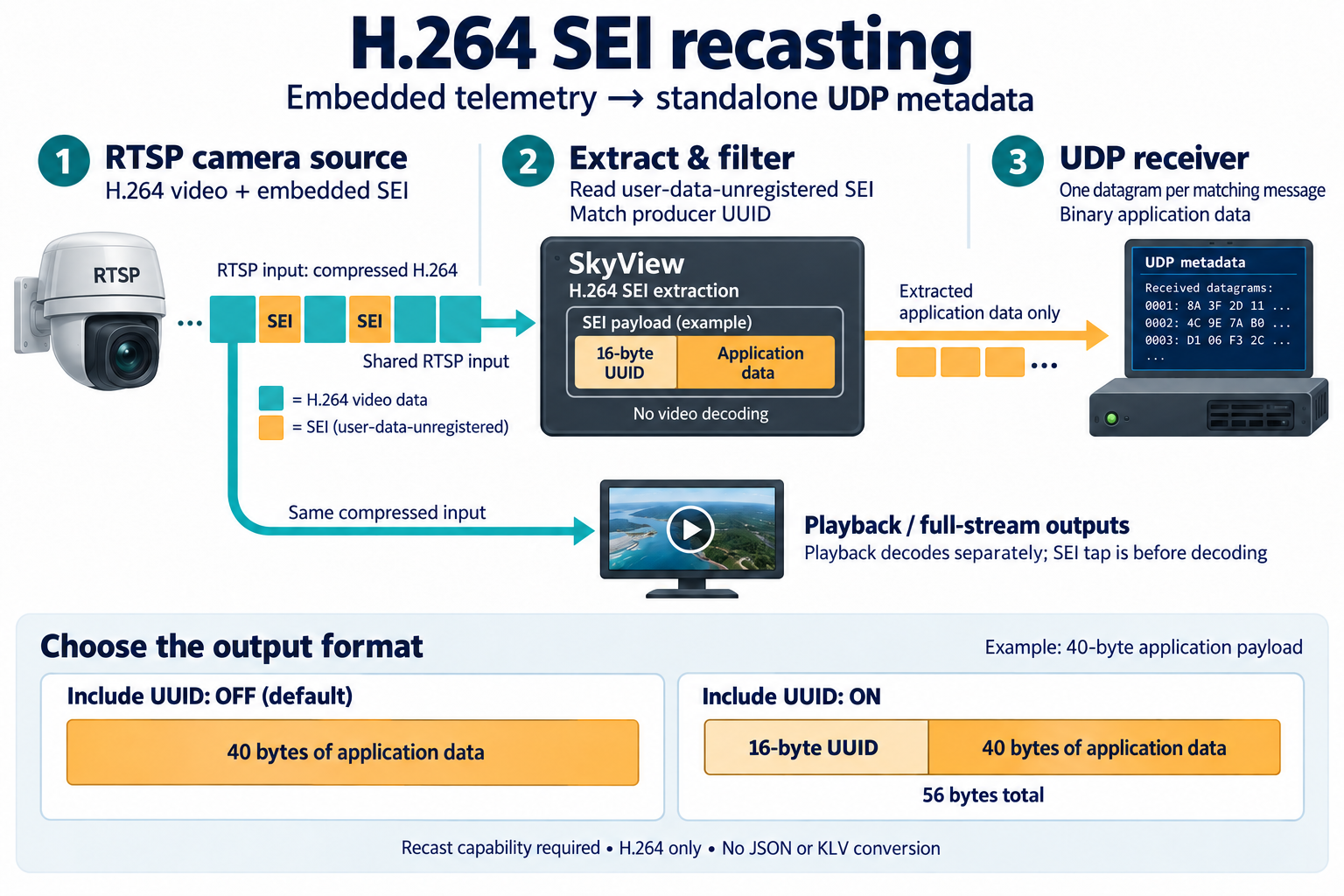
RTSP source example: SkyView taps the shared compressed H.264 input before decoding, matches the producer UUID, and sends one binary UDP datagram per matching SEI message. Playback decodes separately. The 40-byte application payload illustrates the optional UUID prefix; actual payload sizes vary.
The extractor reads compressed video without decoding frames. Each metadata target has its own UUID selection and UDP destination, so one stream can feed several telemetry receivers alongside ordinary playback and recasting.
Before you start
- Enable the Recast capability and select Recast or Play and Recast for the stream. A data-only source cannot use this target payload.
- Confirm the source contains H.264 user-data-unregistered SEI with the mandatory UUID. H.265 and legacy UUID-less SEI are unsupported.
- Obtain the producer's UUID and binary data format from the camera, encoder, or telemetry application. The UUID identifies the embedded message producer; it is not the SkyView stream or target ID.
- Configure the receiving application to listen for binary UDP datagrams on the chosen destination port.
Configure the target
- Open the stream configuration and select Recast or Play and Recast.
- Open Outputs, click Add, and choose UDP as the target type.
- Enter a destination such as
udp://192.168.1.100:5000. For a PCAP source, choose Custom destination to send telemetry to a dedicated receiver; Captured destination uses the selected flow's recorded destination. - If the Input selector is available, choose Original source to extract the incoming metadata, or Flywheel to extract from the processor output. The selected output must contain supported H.264 SEI messages.
- Set Payload to H.264 SEI metadata.
- Set UUID filter to Specific UUID and enter the producer's UUID,
for example
00010203-0405-0607-0809-0a0b0c0d0e0f. Use the standardxxxxxxxx-xxxx-xxxx-xxxx-xxxxxxxxxxxxhexadecimal form. Choose Any UUID only when you want every user-data-unregistered message. - Set Include UUID in output according to the receiving application's expected message format.
- Save the target and stream, then start the stream if needed. Inspect the output status and confirm received bytes in the telemetry application.
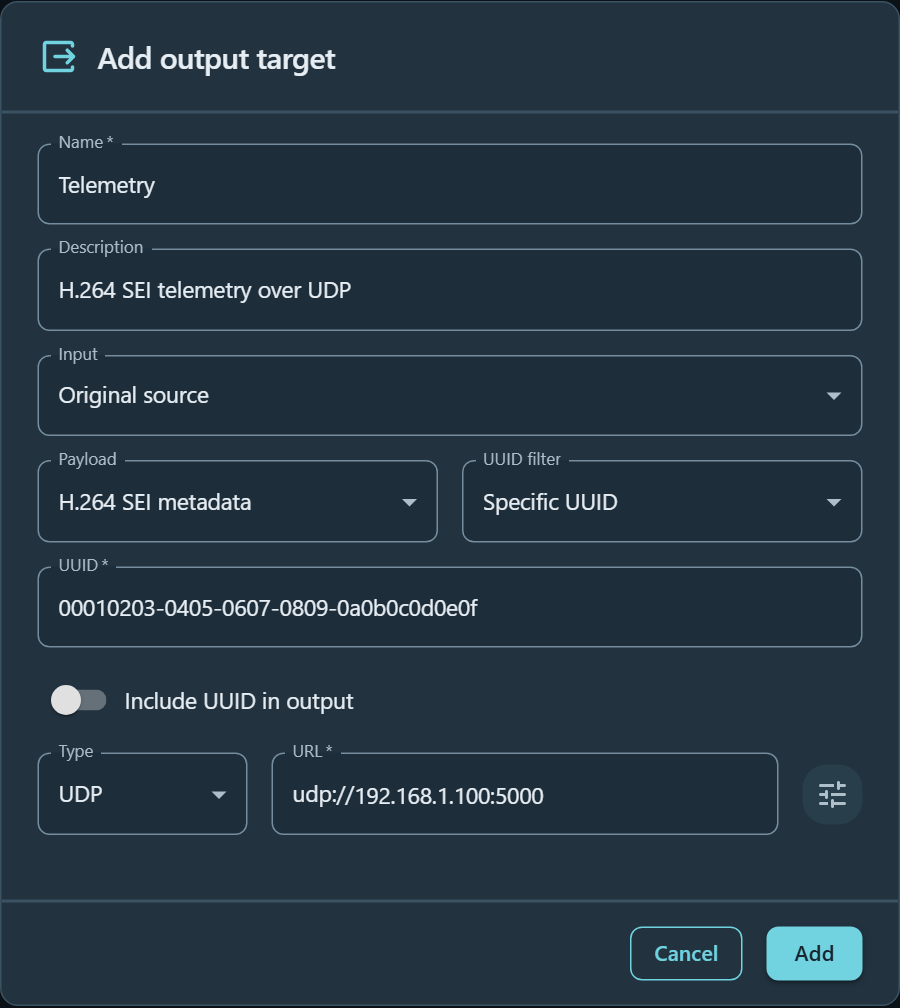
A metadata-only UDP target sending to 192.168.1.100:5000, filtered by the
example producer UUID. Include UUID in output is off, so only application data
is forwarded.
A specific UUID prevents unrelated encoder identification messages from reaching your receiver. Any UUID forwards all qualifying messages, including messages that are not telemetry.
| Target setting | Effect |
|---|---|
| Payload → Full stream | Ordinary UDP recasting; forwards the selected stream instead of extracting SEI. This remains the default. |
| Payload → H.264 SEI metadata | Extracts matching SEI messages and sends their binary payloads over UDP. |
| UUID filter → Specific UUID | Forwards only messages with the configured 16-byte UUID. |
| UUID filter → Any UUID | Forwards messages with any UUID. |
| Include UUID in output off | Sends only the application data following the UUID. |
| Include UUID in output on | Sends the 16 raw UUID bytes followed by application data. It does not send the UUID as text. |
By default the datagram contains only the telemetry bytes after the UUID. Enable Include UUID in output if your receiver expects the 16-byte UUID prefix. TTL, interface, and socket buffer settings retain their ordinary UDP meanings.
For example, if the embedded user data is [16 UUID bytes][40 telemetry bytes],
the output is a 40-byte datagram with Include UUID in output off, or a
56-byte datagram with it on. The illustrative UUID above must be replaced with
the UUID used by your source.
Binary format
One matching H.264 SEI message produces one binary UDP datagram. The extractor handles NAL type 6 and SEI payload type 5, removes emulation-prevention bytes, and requires the mandatory 16-byte UUID. It strips NAL/SEI headers and RBSP trailing bits. It does not decode telemetry fields, change byte order, add a timestamp or length envelope, or validate/remove an embedded telemetry CRC. The supplied bytes remain suitable for the receiver's own structure and CRC processing. The datagram carries no video, audio, MPEG-TS, or RTP framing.
Messages exceeding 65,507 output bytes are dropped, never truncated or split into application fragments. The limit includes the UUID when UUID output is enabled. UDP/IP delivery and fragmentation still depend on the network MTU.
Sources and lifecycle
MPEG-TS transport is tapped from UDP, SRT, UDS, file, and PCAP sources without reopening or independently advancing replay. The first H.264 video track in the first program's PMT is selected. Processor-selected targets extract from that processor's output rather than the original stream.
RTSP metadata targets share the main RTSP input with playback. The tap is before decoding, so playback transcoding does not replace the original SEI. Recast-only RTSP extraction starts the compressed input without a video decoder. This feature does not consolidate existing separate preview, LL-HLS, or WHIP connections.
Extraction continues without a browser player. Each target has bounded input storage (4 MiB / 256 entries); overflow drops oldest input and resets partial parsing. Source discontinuities, replay loops, and reconnects reset parser state. Clean EOF flushes complete final messages. A slow or failing metadata destination does not stop other outputs or playback.
Status and troubleshooting
Output details show Waiting for matching SEI, Forwarding, Unsupported codec, Stopped, or Output error, with forwarded/dropped counters and the last successful send time. A successful UDP send confirms local socket delivery, not receipt by the remote application. Drops include malformed messages and discarded input chunks; they are not a count of identifiable lost telemetry records.
| Status or symptom | Meaning and action |
|---|---|
| Waiting for matching SEI | No matching message has been forwarded yet. Confirm incoming media, H.264 SEI presence, the selected input, and the UUID. This can be expected for sources with infrequent telemetry. |
| Forwarding | Matching messages have been sent. Confirm receipt in the destination application as well. |
| Unsupported codec | The selected video is not supported for H.264 SEI extraction. Select a source or processor output containing H.264. |
| Stopped | The output is not running. Check stream mode, target enablement, and stream state. |
| Output error | Inspect the reported error and UDP destination settings. |
| Receiver gets unrelated data | Use Specific UUID instead of Any UUID. |
| Receiver cannot parse the data | Check whether it expects the UUID prefix and confirm the producer's binary layout and CRC handling. |
| Dropped counter increases | Check malformed input, discontinuities, queue overflow, and payload size. Oversized output is dropped rather than truncated. |
API example
The target engine remains udp; extraction settings live alongside transport settings:
{
  "id": "telemetry",
  "inputType": "source",
  "engines": [{
    "type": "udp",
    "config": {
      "url": "udp://192.168.1.100:5000",
      "payloadMode": "h264Sei",
      "sei": {
        "uuidFilter": "00010203-0405-0607-0809-0a0b0c0d0e0f",
        "includeUuid": false
      }
    }
  }]
}
Omit uuidFilter to match any UUID. Omit both payloadMode and sei for ordinary
full-stream forwarding. These fields survive stream configuration export/import.