PCAP Streamer
The PCAP streamer forwards the UDP payloads from a selected PCAP or PCAPNG flow to one or more outputs. It lets you reproduce a captured network feed for a receiver, test bench, or another SkyView instance without needing the original sender.
Configure the PCAP source as described in PCAP Playback, then use Recast or Play and Recast mode to add outputs. PCAP streaming requires the Recast license option.
Source-to-Target Model
PCAP/PCAPNG file
    |
Selected UDP flow
    |
PCAP replay source
    |
    +-- UDP target (captured or custom destination)
    +-- UDP target (custom destination)
    +-- SRT target
    +-- UDS target
The source is read once and can feed several independent targets. A target failure does not remove the source or stop delivery to the other targets.
Add Output Targets
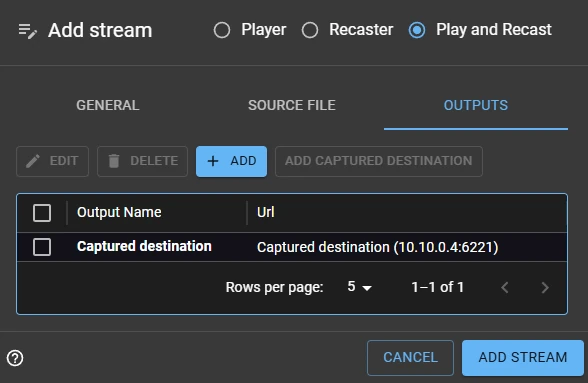
- Create or edit a PCAP stream and set its mode to Recast or Play and Recast.
- Open the Outputs tab.
- Click Add and select the required target type: UDP, SRT, or UDS.
- Enter a distinct target name and the destination details, including any protocol-specific settings.
- Repeat to fan out the replay to additional destinations.
- Save the stream. At least one output target is required in a recast mode.
Use Play and Recast when an operator also needs browser playback. Use Recast for headless forwarding; a WebRTC playback target is not required.
UDP Destination Modes
PCAP streams provide two ways to configure a UDP output:
Captured destination
Choose Captured destination to send to the destination IP address and port stored in the selected UDP flow. This is convenient for reproducing a capture against the same destination configuration without retyping the endpoint.

The target uses the operating system's normal UDP stack. SkyView preserves the UDP payload and sends it to the selected destination, but it does not spoof the captured source IP address or rebuild Ethernet headers, VLAN tags, DSCP, TTL, or packet checksums.
Custom destination
Choose Custom destination when replay must go to a different host, multicast group, or UDP port. Add more custom UDP targets to send the same replay to several endpoints at once.
Use a custom destination for lab testing, for a receiver that is not located at the original destination, or when the capture's original address is no longer reachable.
SRT and UDS Targets
An SRT target transports the replay to an SRT receiver and exposes the protocol settings required by that receiver, such as latency, stream ID, and encryption settings. Use it when the receiver is remote or the network needs SRT's resilience features.
An UDS target forwards the replay to a Unix domain socket on the same host. Use an absolute, permitted socket path and choose the socket mode that the receiving application expects. See Creating a Recast Stream for UDS target guidance and path constraints.
Payload and Timing Considerations
Normal UDP, UDS, and SRT targets forward the selected UDP payloads using capture timing and let the operating system create new network headers. A Raw PCAP target instead injects the captured Ethernet frame unchanged or with its destination MAC, IPv4 address, and UDP port rewritten. See Raw PCAP replay.
For MPEG-TS payloads, SkyView can also decode the replay for local viewing and snapshots. For opaque data payloads, use Recast mode; the payload is forwarded but cannot be rendered in the browser. If loop is enabled on the PCAP source, every target receives the replay again when the selected flow reaches end of file.
Operational Checks
Before relying on a replay, confirm the following:
- The selected capture flow is the intended video, metadata, or data stream.
- Each output target is reachable and configured for the receiver's expected protocol and port.
- The destination can accept the capture's original packet rate and timing.
- Loop replay is enabled only when the receiver expects a continuous stream.
- The stream has at least one configured output target in Recast mode.
For a receiver that needs a different destination address, choose a custom UDP target rather than modifying the capture file.