Snapshots
SkyView allows you to capture snapshots from live video streams with optional embedded geospatial and telemetry metadata. Snapshots can be saved as standard JPEG images or enriched with metadata in EXIF, XMP, or NITF formats (optional).
Capturing a Snapshot
To capture a snapshot from the video player:
- Click the camera icon in the player toolbar

- The export dialog will display a preview of the captured image
- Configure your export options (see below)
- Click Save to download the snapshot
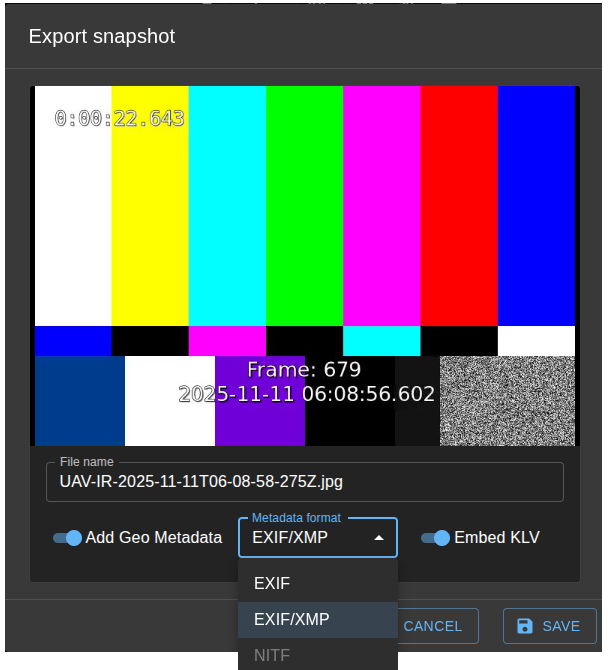
Export Options
File Name
Enter a custom file name for your snapshot. The file extension will be automatically added based on the selected format:
.jpgfor standard JPEG, EXIF, and EXIF/XMP formats.ntffor NITF format
Geo Metadata Formats
When the Add Geo Metadata toggle is enabled, you can choose from several metadata formats to embed telemetry data into your snapshot:
EXIF (Exchangeable Image File Format)
EXIF is the most widely supported metadata format, compatible with most image viewers and editing software.
What's embedded:
- GPS coordinates (latitude, longitude, altitude) from MISB 0601 tags 13, 14, 15
- Image direction (calculated from platform heading + sensor azimuth) from tags 5 and 18
- Timestamp information (capture date/time)
- Platform and stream names in the UserComment field
- Standard EXIF metadata (Software, DateTime, etc.)
Use EXIF when:
- You need maximum compatibility with standard photo viewers
- You want basic GPS location embedding
- You're sharing images with non-specialized applications
EXIF/XMP
This format combines EXIF metadata with Adobe XMP (Extensible Metadata Platform), providing richer metadata storage capabilities.
What's embedded:
- All EXIF metadata (as described above)
- XMP packet with platform and stream information
- Optional full KLV telemetry data (when "Embed KLV" is enabled)
Embed KLV Option:
When enabled, the complete KLV metadata packet is embedded as JSON in the XMP skyview:KLVData field. This includes all available MISB 0601 telemetry tags present at the moment of capture.
Use EXIF/XMP when:
- You need to preserve complete telemetry data for analysis
- You're working with professional imaging workflows
- You want to store custom metadata beyond basic GPS
- You need to maintain full mission metadata with the image
NITF (National Imagery Transmission Format)
NITF is a U.S. Department of Defense standard format used for imagery intelligence and military applications.
What's embedded:
- Complete NITF 2.1 file structure with image segment
- Security classification metadata from MISB 0102 (tag 48)
- Geographic coordinates in the image header
- Data Extension Segment (DES) with KLV metadata in JSON format
- Platform, stream, and telemetry information
Use NITF when:
- You need DoD-compliant imagery format
- Security classification marking is required
- Working with defense or intelligence applications
- Interoperating with GEOINT systems
Note: NITF export is currently disabled in the UI.
Metadata Source
All metadata embedded in snapshots comes from the most recent KLV (Key-Length-Value) telemetry packet received from the video stream at the time of capture. This includes:
- Tag 13: Sensor Latitude
- Tag 14: Sensor Longitude
- Tag 15: Sensor True Altitude
- Tag 5: Platform Heading Angle
- Tag 18: Sensor Relative Azimuth Angle
- Tag 48: Security Local Metadata Set (MISB 0102)
- Other MISB 0601 telemetry tags (when "Embed KLV" is enabled)
If no KLV metadata is available, snapshots will be saved as standard JPEG images without geospatial information.