📝 Server logs
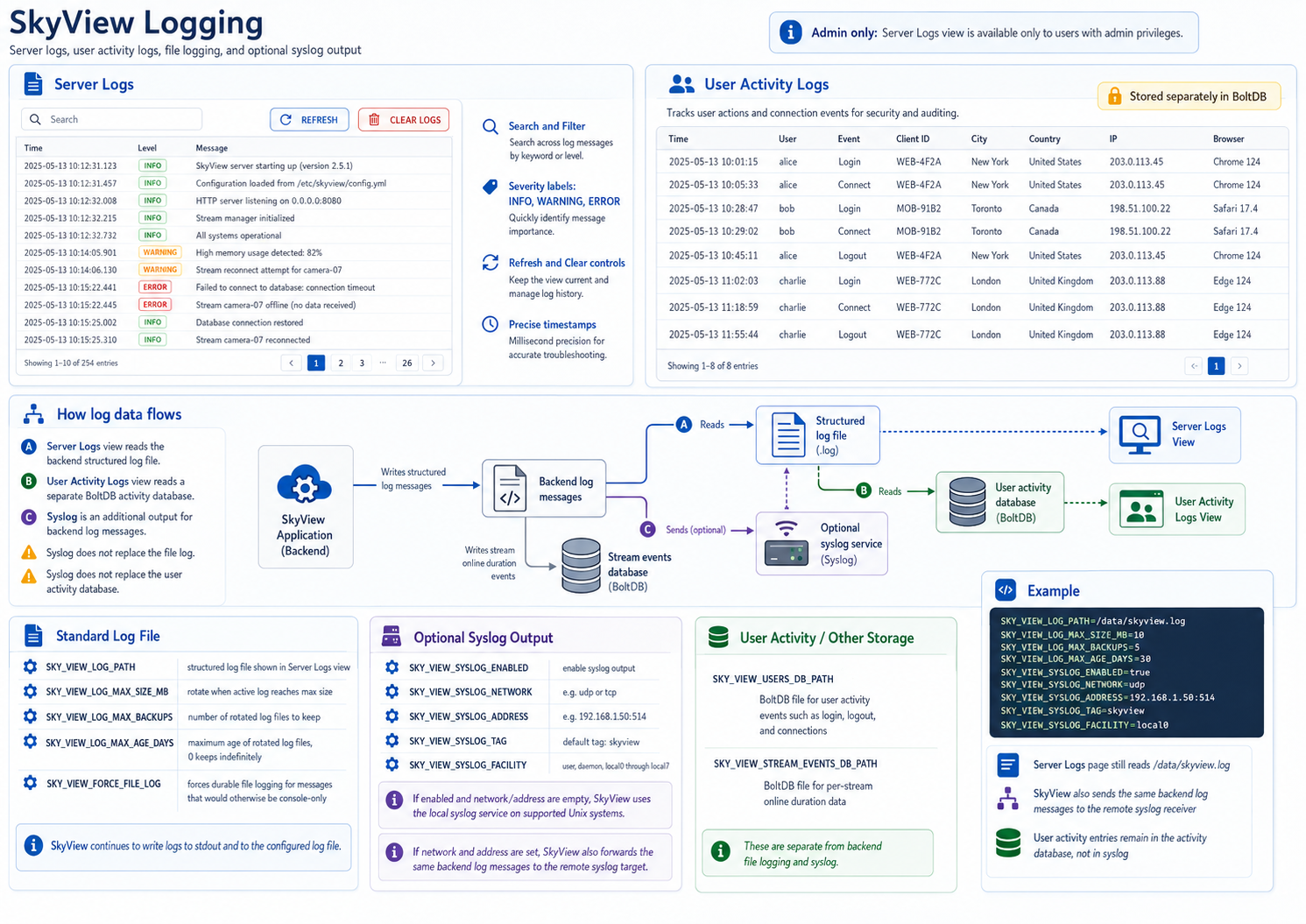
The Server Logs view provides detailed insight into the SkyView backend operation. It displays system messages, component startup and shutdown information, runtime status updates, etc - all useful for diagnosing issues and verifying normal operation.
To view the server’s activity and error history, select the Logs from the main menu:
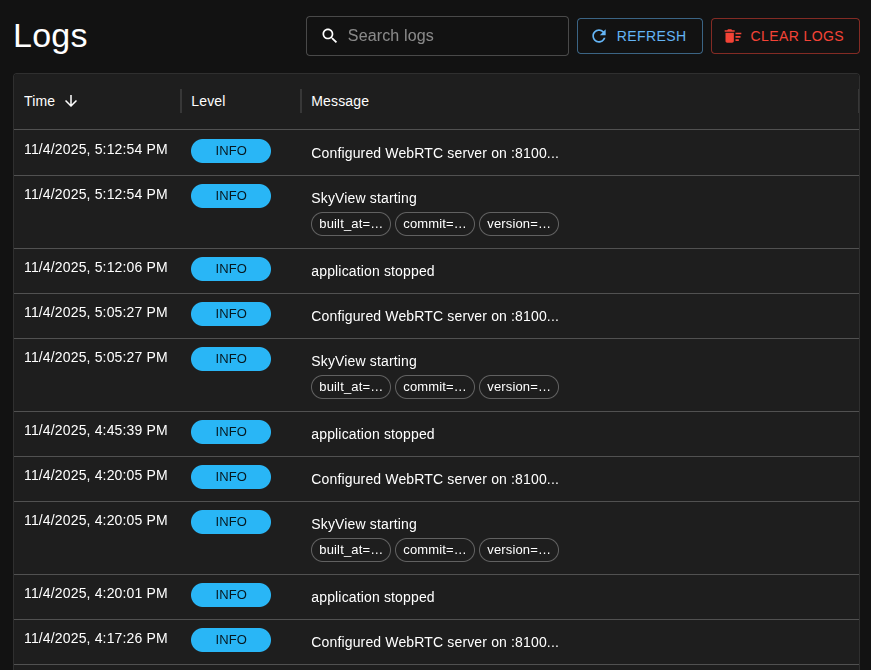
Features:
- Search and Filter – Use the Search bar at the top to quickly locate specific entries or keywords.
- Severity Levels – Each log entry includes a level label such as:
- INFO – informational messages (e.g., startup, configuration events)
- WARNING – non-critical issues
- ERROR – critical problems or failures
- Refresh and Clear Controls:
- REFRESH updates the log view to include the latest messages.
- CLEAR LOGS removes all entries from the view (useful when troubleshooting to see only new events).
- Timestamps – Each entry includes a precise timestamp for accurate sequencing.
Log Access
Only users with admin privileges can view the logs.
User Activity Logs
The User Activity Logs table provides a detailed table of user actions and connection events. This log helps administrators monitor access and usage patterns for security and auditing purposes.
The table displays the following columns:
- Time: The timestamp of the event.
- User: The username or account associated with the activity.
- Event: The type of action or event (e.g., login, logout, etc).
- Client ID: The unique identifier for the client session.
- City: The detected city of the client’s IP address.
- Country: The detected country of the client’s IP address.
- IP: The IP address from which the user connected.
- Browser: The browser or client software used to access the system.
Log File and Syslog Configuration
SkyView uses two different storage paths for log-related information:
- The Server Logs view reads the backend structured log file.
- The User Activity Logs view reads a separate BoltDB activity database.
This means syslog support does not replace the normal server log file, and it does not replace the user activity database. Syslog is an additional output for backend log messages.
Standard Log File
The backend log file is controlled by these environment variables:
SKY_VIEW_LOG_PATH: Path to the structured log file shown in the Server Logs view.SKY_VIEW_LOG_MAX_SIZE_MB: Maximum size of the active log file before rotation.SKY_VIEW_LOG_MAX_BACKUPS: Number of rotated log files to keep.SKY_VIEW_LOG_MAX_AGE_DAYS: Maximum age of rotated log files. Use0to keep them indefinitely.SKY_VIEW_FORCE_FILE_LOG: When enabled, messages that would normally be console-only are still written to durable log outputs.
The server continues to write logs to stdout and to the configured log file. The UI log page reads from the file path configured by SKY_VIEW_LOG_PATH.
Optional Syslog Output
Syslog can be enabled when you want a second copy of backend log messages to be forwarded to a local or remote syslog service.
SKY_VIEW_SYSLOG_ENABLED: Enables syslog output when set totrue.SKY_VIEW_SYSLOG_NETWORK: Optional network for remote syslog, such asudportcp.SKY_VIEW_SYSLOG_ADDRESS: Optional remote syslog address, such as192.168.1.50:514.SKY_VIEW_SYSLOG_TAG: Tag written with syslog messages. Default:skyview.SKY_VIEW_SYSLOG_FACILITY: Syslog facility. Supported values areuser,daemon, andlocal0throughlocal7.
If SKY_VIEW_SYSLOG_ENABLED=true and both SKY_VIEW_SYSLOG_NETWORK and SKY_VIEW_SYSLOG_ADDRESS are left empty, SkyView uses the local syslog service on supported Unix systems.
If SKY_VIEW_SYSLOG_NETWORK and SKY_VIEW_SYSLOG_ADDRESS are set, SkyView sends the same backend log messages to that remote syslog target as well.
User Activity Log Storage
User activity records are configured separately and are not affected by syslog:
SKY_VIEW_USERS_DB_PATH: BoltDB file for user activity events such as login, logout, and connection records.
If you also use stream event history, that remains separate as well:
SKY_VIEW_STREAM_EVENTS_DB_PATH: BoltDB file for per-stream online duration data.
Example
SKY_VIEW_LOG_PATH=/data/skyview.log
SKY_VIEW_LOG_MAX_SIZE_MB=10
SKY_VIEW_LOG_MAX_BACKUPS=5
SKY_VIEW_LOG_MAX_AGE_DAYS=30
SKY_VIEW_SYSLOG_ENABLED=true
SKY_VIEW_SYSLOG_NETWORK=udp
SKY_VIEW_SYSLOG_ADDRESS=192.168.1.50:514
SKY_VIEW_SYSLOG_TAG=skyview
SKY_VIEW_SYSLOG_FACILITY=local0
With this configuration:
- The Server Logs page still reads from
/data/skyview.log. - SkyView also sends the same backend log messages to the remote syslog receiver.
- User activity entries continue to be stored in the activity database, not in syslog.