Creating a Recast Stream
This guide explains how to add recast targets for an existing stream.
Before You Start
Confirm the license includes the Recast option, otherwise the recast controls are hidden or disabled.
Steps to Create a Recast Target
-
Open the Stream Configuration
- Go to the Stream list and click ADD STREAM button.
-
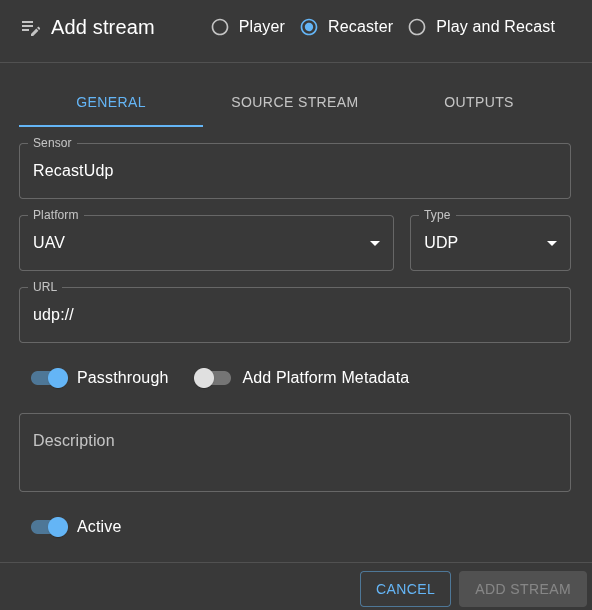
Select Recast (or Play and Recast) option
- Fill in the general information, just like for a playback stream.
- You'll see SOURCE STREAM and OUTPUTS tabs
-
Configure source stream
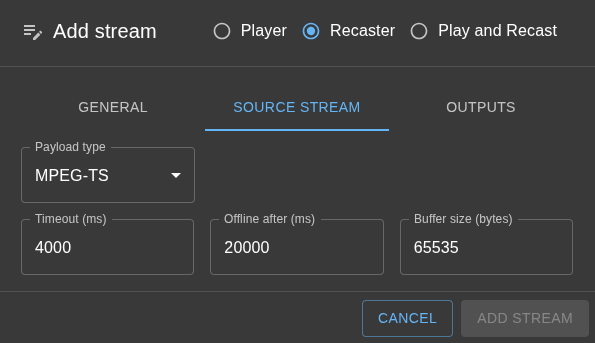
- Select the payload type:
MPEGTS - a regular mpegts or STANAG 4609 stream.
DATA - data stream. No detection is done, the data packets are simply forwarded as they are.
- Select the payload type:
-
Add output targets
- Open the Outputs section.
- Click Add.
- Choose the target type (UDP, UDS, SRT, etc.).
-
Configure Target Parameters
- Set the destination host, port, and protocol-specific settings.
-
Save and Start
- Save the stream configuration.
- The stream will be started automatically.
Optional: Play and Recast
If you also want local playback, select Play and Recast as the stream mode. WebRTC playback is a separate branch controlled by the mode; it is not an output target. Recast targets work independently from browser viewers.
RTSP and H.264 SEI targets
- Choose RTSP Server to publish a live feed or independent file playback to external RTSP clients. See RTSP server for architecture, server settings, delivery formats, and authentication.
- Choose UDP, then Payload → H.264 SEI metadata, to send extracted metadata to a telemetry receiver. See H.264 SEI recasting for UUID filtering and output format.
Recasting to UDS (Unix Domain Socket)
UDS targets allow you to recast streams to a local Unix domain socket. This is ideal when you want to forward streams to other local applications on the same host with minimal latency and no network overhead.
UDS Target Configuration
- When adding an output target, select UDS as the target type.
- Enter the socket path in the URL field (examples below).
- Choose the Socket mode:
- Connection mode (default): SkyView creates a server socket and listens for client connections. External applications can connect to the socket to receive the stream.
- Datagram mode: SkyView uses a datagram socket for packetized delivery.
Multiple Clients
Unlike TCP/IP where a server typically handles multiple clients, UDS in connection mode allows multiple clients to connect to the same server socket simultaneously. This means:
- Multiple local applications can subscribe to the same recast stream.
- Each client receives the data independently.
- Failure or disconnection of one client does not affect others.
Socket Path Naming Convention
Use the following recommended patterns for UDS socket paths:
- Recast (server) outputs:
/tmp/<platform>.<stream>.<target>.sock - Example:
/tmp/skyview.camera1.recast1.sock
Path Constraints
UDS paths must be valid absolute Unix paths with the following restrictions:
- Must start with
/(absolute path). - Maximum length: 107 characters.
- No whitespace, NULL bytes, or shell-special characters (spaces,
;,&,|,$,<,>, backticks, quotes,*,?,!, parentheses, or brackets).
The UI accepts both plain absolute paths and URLs with the uds:// scheme:
- /tmp/skyview.camera1.recast1.sock
- uds:///tmp/skyview.camera1.recast1.sock
- uds:/tmp/skyview.camera1.recast1.sock
Notes
- You can add multiple recast targets per stream.
- If a target fails, the stream continues to run for other outputs.