Snapshots
Snapshots export the current video frame as a still image. Use snapshots when you need a shareable frame capture for reporting, review, measurement, geospatial workflows, or later analysis outside STView.
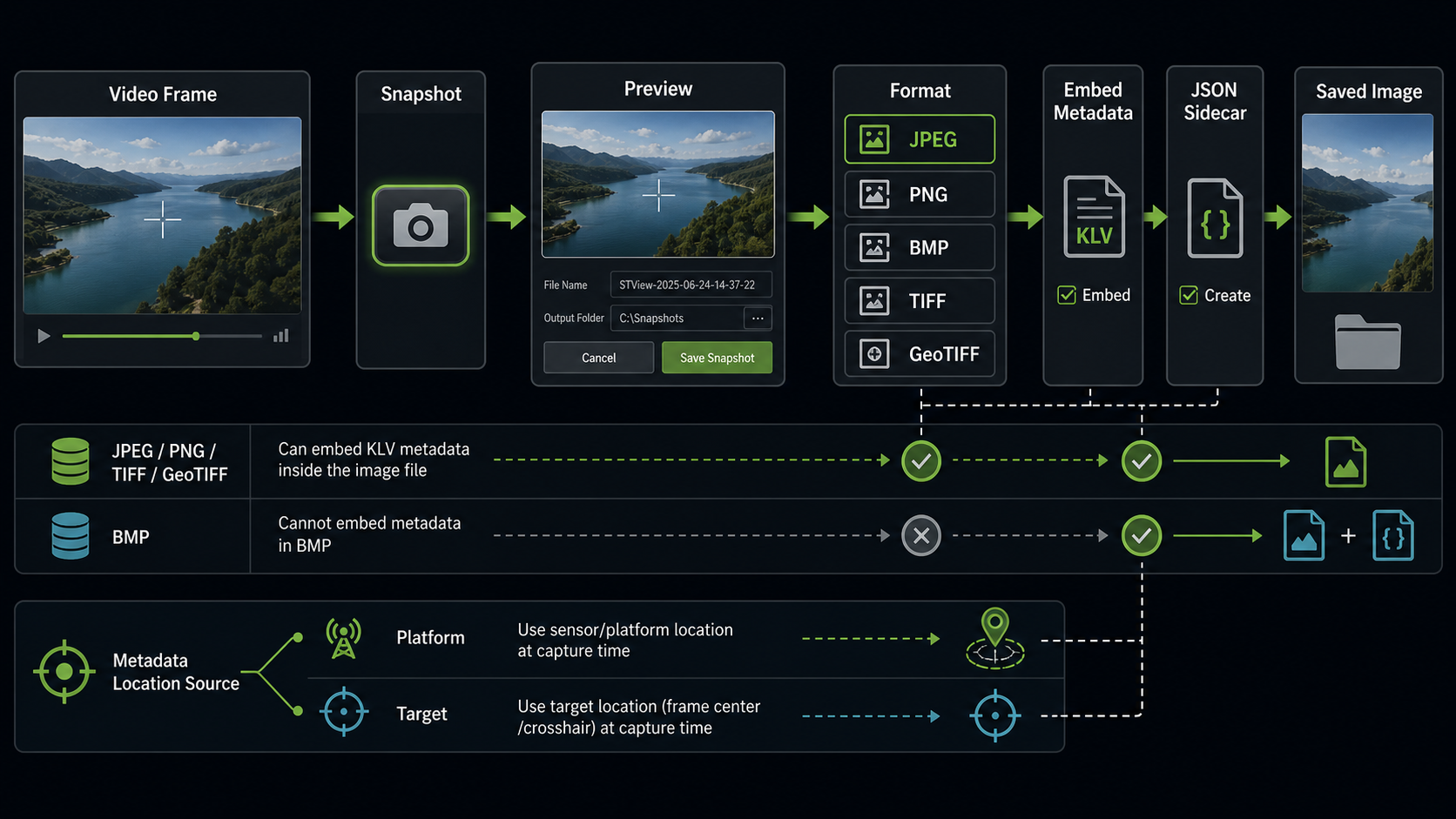
The snapshot export captures the selected frame and writes it to disk in the chosen image format. If KLV metadata is available for the current source, STView can also embed metadata into supported image formats and/or write a JSON sidecar file next to the image.
Basic Workflow
- Open a file or stream and start playback.
- Seek, pause, or step to the frame you want to export.
- Click the Snapshot button in the transport controls.
- Review the captured frame preview in the Export snapshot dialog.
- Select the Image format.
- Choose a Destination folder.
- Choose Automatic pattern or Custom file name.
- Configure metadata export if KLV metadata is available.
- Click Save snapshot.
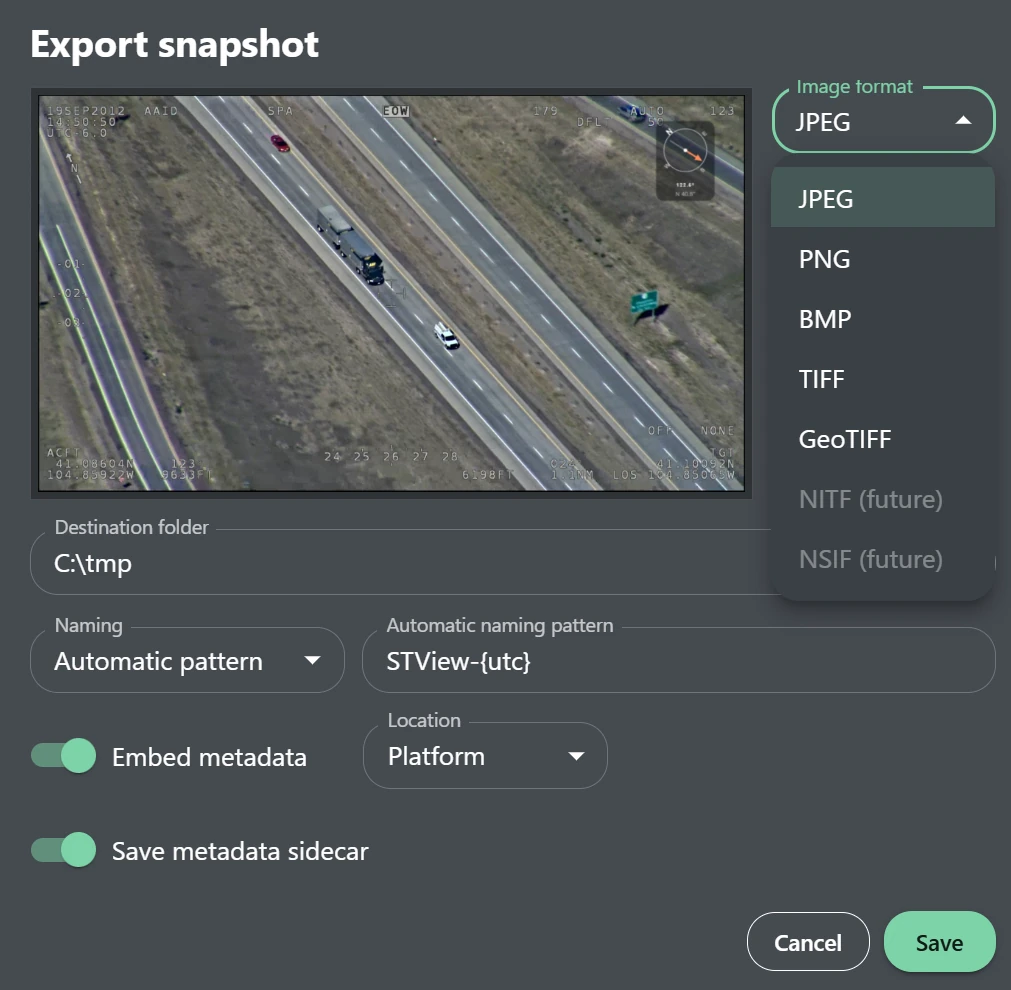
STView captures a preview before saving so the exported frame remains stable while you choose the destination, format, and metadata options. Closing the dialog without saving discards that pending capture.
Image Formats
The Image format field controls the file extension, compression behavior, and metadata options.
| Format | Extension | Embedded metadata | Use when |
|---|---|---|---|
| JPEG | .jpg | Supported | You need a compact, widely compatible image for reports, email, or quick sharing. |
| PNG | .png | Supported | You need lossless image quality, sharp UI/overlay edges, or repeated editing without compression loss. |
| BMP | .bmp | Not supported | You need a simple uncompressed bitmap and do not need metadata inside the image file. |
| TIFF | .tif | Supported | You need archival or analysis-friendly output with metadata support. |
| GeoTIFF | .tif | Supported | You need geospatial image output that can carry location metadata. |
| NITF | .ntf | Future | Listed for future workflows; export is currently disabled in the UI. |
| NSIF | .nsf | Future | Listed for future workflows; export is currently disabled in the UI. |
For metadata-heavy captures, prefer JPEG, PNG, TIFF, or GeoTIFF. If BMP is selected and metadata is available, use Save metadata sidecar so the metadata is preserved in a separate JSON file.
Naming and Destination
Snapshots require a destination folder. The folder must exist and be writable.
With Automatic pattern, STView builds the output name from the configured pattern. The default pattern is:
STView-{utc}
The automatic pattern can include these tokens:
| Token | Meaning |
|---|---|
{source} | The current source name without its file extension or URI query. |
{utc} | The UTC timestamp at snapshot export time. |
{frame} | The current frame index when available. |
With Custom file name, STView uses the exact file name you enter, then adds the extension for the selected format. Characters that are not valid in file names are replaced.
If a file with the same generated path already exists, STView overwrites it when saving through the snapshot dialog.
Metadata Export
Metadata export is available only when the current source has KLV metadata. If no KLV metadata is available, the metadata controls are disabled.
STView has two metadata export paths:
| Option | Result |
|---|---|
| Embed metadata | Writes metadata into the image file when the selected format supports embedded metadata. |
| Save metadata sidecar | Writes a separate JSON file next to the image. The sidecar path is the image path plus .json. |
For example, saving:
D:\Snapshots\STView-2026-06-24T11-30-00Z.jpg
with a sidecar enabled writes:
D:\Snapshots\STView-2026-06-24T11-30-00Z.jpg.json
Sidecars are useful when the target tool cannot read embedded image metadata, when the selected format cannot embed metadata, or when you want a plain JSON record that can be inspected and archived separately.
Location Source
When embedded metadata is enabled, the Location field controls which position is used for geospatial metadata.
| Location | Meaning |
|---|---|
| Platform | Uses the sensor or platform location from the source metadata at capture time. |
| Target | Uses the target location, such as the frame center or crosshair-derived target position, at capture time. |
Use Platform when the image should describe where the collecting platform was. Use Target when the exported still should describe the observed scene or point of interest.
Notes and Limitations
- Snapshot export requires a current decoded frame. If playback has not opened a source or no frame is available yet, the snapshot request fails.
- Metadata options depend on available KLV metadata and the selected image format.
- NITF and NSIF are visible as future formats but are not currently available for export.
- A snapshot is a still-frame export. Use Recording when you need a video segment instead of a single frame.