Local Automation API
STView includes an opt-in local REST automation API for scripts, test tools,
and agent workflows. Automation is disabled by default. When disabled, control
requests return 403 and any queued automation commands or cached automation
state snapshots are cleared.
LLM clients should usually connect through STView's MCP companion server, which wraps this API as model-callable MCP tools. See MCP Server.
Enable automation from:
Settings > Options > Application > Allow automation
The default backend base URL is:
http://127.0.0.1:47792
Packaged STView may choose a dynamic loopback port when it starts. For scripts
that need to attach to the currently running app, read runtime.json from the
STView config directory and use its backendUrl value. The MCP companion does
this automatically.
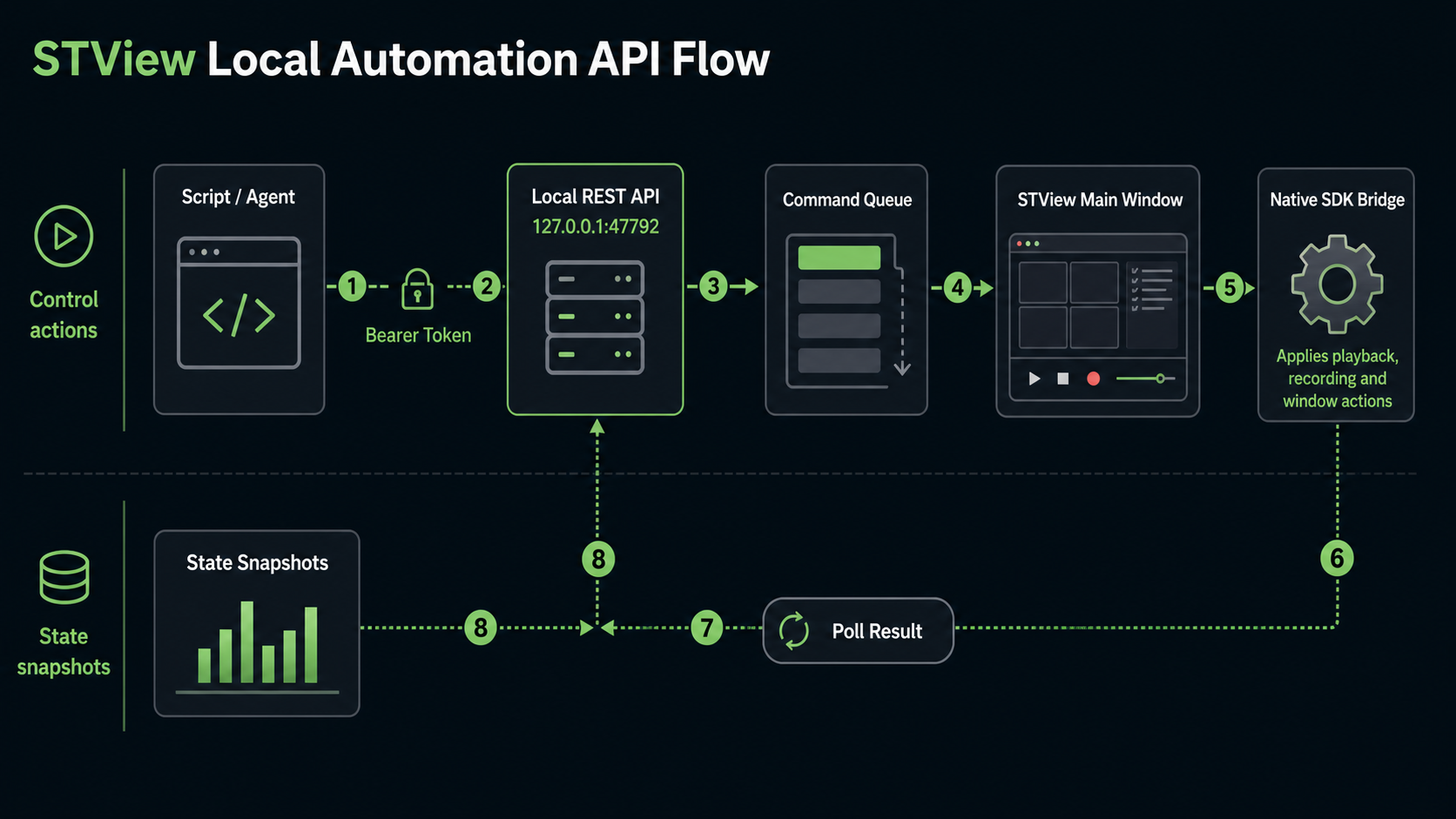
Discovery
Use the unauthenticated discovery endpoint to check whether automation is enabled and to find the v1 base path:
curl -sS http://127.0.0.1:47792/api/automation
Example response:
{
  "ok": true,
  "enabled": true,
  "v1BaseUrl": "/api/automation/v1",
  "actions": ["open", "start", "stop", "pause", "resume", "togglePause", "seek"]
}
For the full action and state-resource list, call the v1 capabilities endpoint with a bearer token:
curl -sS http://127.0.0.1:47792/api/automation/v1/capabilities \
  -H "authorization: Bearer <token>"
Authentication
All /api/automation/v1/* endpoints require:
Authorization: Bearer <token>
Generate or rotate the token from Settings > Options > Application. The UI shows the full token only when it is newly generated, so copy it then and store it in your script environment. Regenerating the token invalidates the previous one.
The token is stored by STView as a hash, not as plain text. If you lose the token, regenerate it.
Sending Actions
Actions are submitted with:
POST /api/automation/v1/actions
The request body always includes action. Some actions also accept top-level
parameters, and all parameterized actions can accept a params object.
Example seek request:
curl -sS -X POST http://127.0.0.1:47792/api/automation/v1/actions \
  -H "authorization: Bearer <token>" \
  -H "content-type: application/json" \
  -d '{"action":"seek","positionSeconds":12.5}'
Most successful submissions return 202 because commands are asynchronous:
{
  "ok": true,
  "commandId": 42,
  "state": "queued"
}
Poll the command until it completes:
curl -sS http://127.0.0.1:47792/api/automation/v1/actions/42 \
  -H "authorization: Bearer <token>"
Completed response:
{
  "ok": true,
  "commandId": 42,
  "state": "completed",
  "result": {
    "running": true,
    "paused": false
  },
  "completedAt": "2026-06-24T12:00:00Z"
}
Failed response:
{
  "ok": false,
  "commandId": 42,
  "state": "failed",
  "error": "positionSeconds must be greater than or equal to 0",
  "completedAt": "2026-06-24T12:00:00Z"
}
If you want the initial request to wait briefly for completion, include
waitMs. STView caps this wait at 30 seconds. If the command finishes within
that window, the endpoint returns 200 with the final result; otherwise it
returns 202 and the command should be polled normally.
curl -sS -X POST http://127.0.0.1:47792/api/automation/v1/actions \
  -H "authorization: Bearer <token>" \
  -H "content-type: application/json" \
  -d '{"action":"status","waitMs":2000}'
Action Reference
| Action | Parameters | Description |
|---|---|---|
open | uri, optional lowLatency, playbackCacheMs, loop | Opens and starts a file or stream. url is accepted as an alias for uri. playbackCacheMs accepts 0 through 5000 and is ignored when low latency is enabled. |
playMission | missionId or name | Opens and starts a persisted mission. Supply a positive mission ID or a non-empty name. |
start | none | Starts the current media. |
stop | none | Stops playback. |
pause | none | Pauses playback. |
resume | none | Resumes playback. |
togglePause | none | Toggles pause/resume. |
seek | positionSeconds | Seeks to an absolute playback position in seconds. |
stepBackward | none | Uses the toolbar's native frame step backward, including presentation-aligned metadata. |
stepForward | none | Uses the toolbar's native frame step forward, including presentation-aligned metadata. |
setPlaybackRate | playbackRate | Sets playback rate from -32 to 32. |
setAudioVolume | audioVolume | Sets audio volume from 0 to 1. |
startRecording | params | Starts recording with the same recording payload used by STView's recorder. |
stopRecording | none | Stops active recordings. |
checkRecordingOutput | params | Checks whether the requested recording output already exists. |
startRecast | params | Starts a UDP, SRT, WHIP, or LL-HLS Recast output from the Original or Flywheel source. |
stopRecast | none | Stops the active Recast output. |
snapshot | params | Exports the current video frame with the supplied snapshot parameters. |
checkClipExportOutput | params | Checks whether the requested clip export output already exists. |
exportClip | params | Exports a cut clip with the supplied source, range, and output parameters. |
showWindow | window | Shows an auxiliary window. |
closeWindow | window | Closes an auxiliary window. |
toggleFullscreen | none | Toggles fullscreen for the main window. |
setWindowSize | width, height | Sets the main window client size. |
setSessionKlvPid | pid | Sets the active KLV PID for the Session view. |
setKlvPid | pid | Sets the active KLV PID for the KLV window. |
setKlvPaused | paused | Pauses or resumes KLV window updates. |
setKlvDetailed | detailed | Toggles the KLV window’s Detailed presentation; the tagged packet is unchanged. |
setOptions | params | Applies app options by merging params into the current options layout. |
refreshLicenseUnlock | none | Refreshes SDK license unlock state. |
setObjectDetection | params | Applies object-detection options by merging params into the current object-detection layout. |
status | none | Returns current playback status. |
Supported window names are options, klv, map, scene, and session. Some aliases
are accepted, such as settings for options, metadata for klv, and
stats or statistics for session.
Supported action aliases include play for start, load for open,
record for startRecording, save-snapshot for snapshot, cut for
exportClip, and resize for setWindowSize. Use the canonical action names
in new scripts.
Examples
Open a local file:
curl -sS -X POST http://127.0.0.1:47792/api/automation/v1/actions \
  -H "authorization: Bearer <token>" \
  -H "content-type: application/json" \
  -d '{"action":"open","uri":"file:///D:/Media/sample.ts"}'
Open a stream with low latency enabled:
curl -sS -X POST http://127.0.0.1:47792/api/automation/v1/actions \
  -H "authorization: Bearer <token>" \
  -H "content-type: application/json" \
  -d '{"action":"open","uri":"udp://239.1.1.1:5000","lowLatency":true}'
Open a stream with a 400 ms playback cache:
curl -sS -X POST http://127.0.0.1:47792/api/automation/v1/actions \
  -H "authorization: Bearer <token>" \
  -H "content-type: application/json" \
  -d '{"action":"open","uri":"udp://239.1.1.1:5000","lowLatency":false,"playbackCacheMs":400}'
Play a saved mission by ID:
curl -sS -X POST http://127.0.0.1:47792/api/automation/v1/actions \
  -H "authorization: Bearer <token>" \
  -H "content-type: application/json" \
  -d '{"action":"playMission","missionId":42}'
Show the map window:
curl -sS -X POST http://127.0.0.1:47792/api/automation/v1/actions \
  -H "authorization: Bearer <token>" \
  -H "content-type: application/json" \
  -d '{"action":"showWindow","window":"map"}'
Set the main window size:
curl -sS -X POST http://127.0.0.1:47792/api/automation/v1/actions \
  -H "authorization: Bearer <token>" \
  -H "content-type: application/json" \
  -d '{"action":"setWindowSize","width":1280,"height":720}'
Export a snapshot:
curl -sS -X POST http://127.0.0.1:47792/api/automation/v1/actions \
  -H "authorization: Bearer <token>" \
  -H "content-type: application/json" \
  -d '{
    "action": "snapshot",
    "params": {
      "format": "jpeg",
      "outputPath": "D:/Captures/frame.jpg",
      "overwrite": true
    }
  }'
Export a cut clip:
curl -sS -X POST http://127.0.0.1:47792/api/automation/v1/actions \
  -H "authorization: Bearer <token>" \
  -H "content-type: application/json" \
  -d '{
    "action": "exportClip",
    "params": {
      "sourceUriOrPath": "file:///D:/Media/source.ts",
      "format": "mpegts",
      "outputPath": "D:/Exports/source-cut.ts",
      "startSeconds": 12.5,
      "endSeconds": 42,
      "overwrite": false
    }
  }'
Enable object detection with a model:
curl -sS -X POST http://127.0.0.1:47792/api/automation/v1/actions \
  -H "authorization: Bearer <token>" \
  -H "content-type: application/json" \
  -d '{
    "action": "setObjectDetection",
    "params": {
      "enabled": true,
      "modelPath": "D:/Models/yolo.onnx",
      "provider": "auto",
      "inputWidth": 960,
      "inputHeight": 960,
      "maxFps": 10
    }
  }'
Start recording:
curl -sS -X POST http://127.0.0.1:47792/api/automation/v1/actions \
  -H "authorization: Bearer <token>" \
  -H "content-type: application/json" \
  -d '{
    "action": "startRecording",
    "params": {
      "mode": "mpegts",
      "outputDirectory": "D:/Recordings",
      "baseName": "mission-001",
      "segmentDurationMs": 0,
      "hlsSegmentFormat": "mpegts",
      "videoPassthrough": true,
      "videoCodec": "h264",
      "videoBitrateKbps": 6000,
      "videoKeyframeInterval": 60
    }
  }'
Start an Original-source UDP Recast output:
curl -sS -X POST http://127.0.0.1:47792/api/automation/v1/actions \
  -H "authorization: Bearer <token>" \
  -H "content-type: application/json" \
  -d '{
    "action": "startRecast",
    "params": {
      "source": "original",
      "targetProtocol": "udp",
      "targetUri": "udp://239.1.1.2:5000"
    }
  }'
For LL-HLS, use targetProtocol: "llhls". Set hlsPlaybackUrl, for example
http://127.0.0.1:56700/live/camera1/index.m3u8, for a stable hosted URL.
targetUri is also accepted when hlsPlaybackUrl is empty. Omit both for an
automatic URL. The URL sets the advertised host, fixed port and stream path;
hlsBindAddress still selects the local listener interface. Optional fields
are hlsSegmentFormat (mpegts or mp4), hlsBindAddress (default 127.0.0.1),
hlsAdvertisedHost, hlsPort (default 0), hlsSegmentDurationMs (default
2000), hlsPartDurationMs (default 200), hlsWindowSegments (default 15),
hlsTlsCertificatePath, and hlsTlsKeyPath. A wildcard bind address requires an
advertised host; TLS requires both file paths. Segment duration must be at least
three times the part duration. Start completion reports recastTargetUri as the
playback URL, recastHlsFormat as the selected format and recastMetadataUri for
CMAF's KLV sidecar. These values are also available through Recast status.
Stop Recast with {"action":"stopRecast"}. Flywheel and WHIP parameters
follow the same fields described for stview_start_recast in
MCP Server.
State Resources
STView publishes cached automation state while automation is enabled and the main window is running. Read all available resources:
curl -sS http://127.0.0.1:47792/api/automation/v1/state \
  -H "authorization: Bearer <token>"
Read a single resource:
curl -sS http://127.0.0.1:47792/api/automation/v1/state/status \
  -H "authorization: Bearer <token>"
Resources are:
statussessionklvobjectDetectionrecording
Each response includes updatedAt, ageMs, and stale. A snapshot is marked
stale when it is older than 5 seconds. If no snapshot is available yet, the
state endpoint returns 503.
The session resource's stored ingest summaries refresh in the background.
They may lag its live playback and ingest-progress fields briefly; updatedAt
describes publication of the overall snapshot, not completion of a database query.
Example single-resource response:
{
  "ok": true,
  "resource": "status",
  "updatedAt": "2026-06-24T12:00:00Z",
  "ageMs": 245,
  "stale": false,
  "data": {
    "running": true,
    "paused": false
  }
}
KLV presentation
setKlvDetailed changes the KLV window’s jsonMode (brief or detailed).
The klv state resource exposes that window state under window, including
selectedOrigin, selectedPid, paused, jsonMode, and packet. Existing
top-level KLV PID and statistics fields continue to describe the Session view.
The frontend derives descriptive labels from the packet’s briefJsonText using
the bundled libmisb converter. Packets no longer include detailedJsonText;
clients should consume briefJsonText regardless of the window’s mode.
Switching modes works on the frozen packet while paused is true and does not
request another decode. Downloads continue to use Brief JSON.
Execution Model
Automation commands are queued by the local backend and consumed by the running STView application. The backend does not directly mutate live playback state. STView polls queued commands, applies them, and reports completion or failure back to the backend.
This split matters operationally:
- STView must be running with the main window alive for commands to complete.
- A queued command may remain
queueduntil the main window consumes it. - Commands and results expire after about 10 minutes.
- The backend keeps at most 200 queued commands.
- Disabling automation clears queued commands, results, and cached state.
Security and CORS
The automation API is intended for local use. Keep the backend bound to
loopback and do not share the bearer token. CORS is limited to same-host
loopback origins and configured development origins. Additional allowed origins
can be supplied through STVIEW_BACKEND_CORS_ORIGINS.
Automation can also be controlled by environment in managed setups:
STVIEW_APP_ALLOW_AUTOMATIONcan force automation on or off.STVIEW_APP_AUTOMATION_TOKENcan provide the token value to hash and use.
Common Errors
403 automation is disabled means Allow automation is off or an environment
override disabled it.
403 automation token is not configured means automation is enabled but no
token has been generated or provided.
401 invalid automation token means the bearer token is missing or does not
match the configured token hash.
400 unsupported automation action means the action value is not recognized.
400 positionSeconds is required for seek means the seek action needs a
numeric positionSeconds value.
503 automation state snapshot is not available means the main window has not
published a state snapshot yet, or automation was just enabled and the first
snapshot is still pending.
Output telemetry in status
The existing status resource includes recastTargets and recorderOutputs
arrays. Each entry contains id, source (original or flywheel),
destination, state, bitrateBps (number or null when unavailable),
sizeBytes, currentError, lastError, and lastErrorAt (Unix milliseconds,
zero if no error). States are connecting, waiting, active, disconnected,
and error; successfully stopped outputs are omitted. Failed start attempts
may use the ID attempt. The UI alone adds transient starting/connecting
feedback while a native start request is pending.
The existing scalar fields remain available. recastLastError continues to
represent the current output error and clears on recovery, while each array
entry's lastError retains the previous error and original occurrence time.
No new automation action or authentication behavior is introduced. Output
addresses and errors in these arrays redact URI credentials and query strings.
Pattern source KLV
Existing source actions accept Pattern URLs with klv_enabled (0/1), klv_pid,
klv_type (0 ASYNC / 1 SYNC), klv_every_frame (0/1), klv_diagnostics (0/1), klv_rate (Hz),
klv_revision (1–19), and klv_template (URL-encoded JSON including tag 65).
The revision must match template tag 65. Missing settings preserve video-only
behavior. Rate is used only when generation is enabled and every-frame mode is
off; it must be 1–60 Hz and no higher than video FPS. PID 257 is reserved for video.
Diagnostics default to off and require ST 0601 revision 13 through 19 when KLV
is enabled. They add frame timing, dimensions, and exact FPS; see the Pattern
guide for mappings and outgoing-only template overrides. time=1 shows elapsed
and absolute UTC time independently of diagnostics.
The native SDK validates the MISB template before starting generation.
Commands retain the existing asynchronous execution path and error reporting. Pattern recordings accept MP4 or H.264/H.265 MPEG-TS; only MPEG-TS carries KLV. See Pattern sources for defaults and timing behavior.
3D window
The existing showWindow and closeWindow actions also accept scene (alias 3d) for the detached 3D presentation. This uses the same queued main-view executor as the other windows.