Stream Detection Information
Overview
SkyView player provides detailed stream detection information for incoming video streams, for example the MPEG-TS (STANAG 4609) format. This information helps users understand the structure and status of the video, audio, data, and metadata streams being received and decoded by the player.
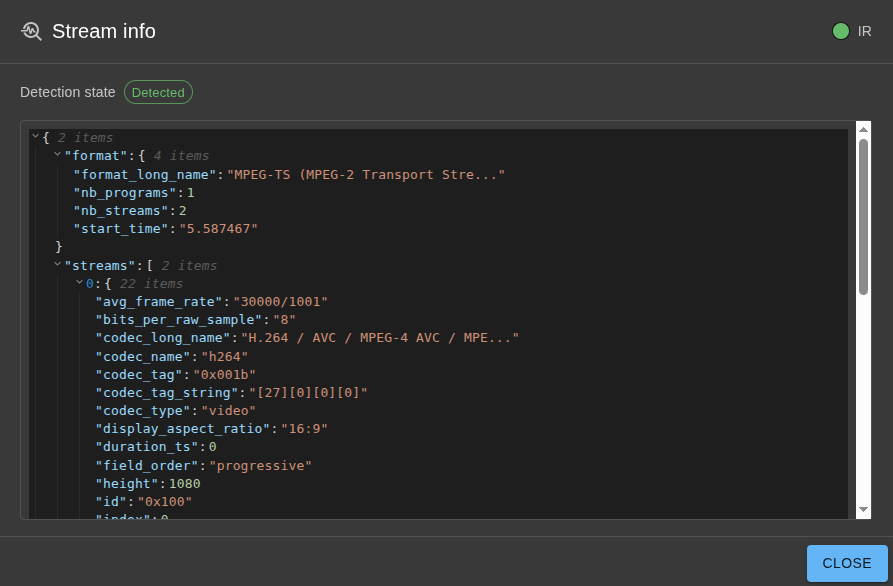
To display this information, press the Stream Detection button.

Stream detection info window
When is Stream Information Detected?
- Initial Detection: Stream parameters are detected when the player first starts to receive a stream.
- Re-detection: If the stream is lost, goes offline, or is interrupted (for predefined "stream lost" period or time), the player will re-detect and update the stream information when the stream resumes. This is important because stream parameters (such as codecs, bitrates, or metadata types) may change when the stream comes back online.
Types of Streams Detected
SkyView analyzes the MPEG-TS container and identifies the following elementary streams:
-
Video Streams:
- Codec type (e.g., H.264/AVC, H.265/HEVC)
- Resolution, frame rate, aspect ratio
- Bitrate
- Stream PID (Packet Identifier)
-
Audio Streams:
- Codec type (e.g., AAC, MPEG Audio)
- Channels, sample rate, bitrate
- Stream PID
-
Data Streams:
- Any non-video/audio elementary streams (e.g., telemetry, custom data)
- PID and format information
-
KLV Metadata Streams:
- KLV (Key-Length-Value) metadata is commonly used in STANAG 4609 for geospatial and sensor data
- Metadata PID
- KLV packet type and parsing status
- KLV ASYNC/SYNC Type
- SYNC Type:
Synchronized streams are tied to the video frame timing. KLV metadata in SYNC mode is aligned with video frames, ensuring metadata matches the visual content. - ASYNC Type:
Asynchronous streams are not tied to video frame timing. KLV metadata in ASYNC mode may arrive independently of video frames, which is typical for telemetry or sensor data that updates at a different rate than video.
- SYNC Type:
Displayed Information
The stream detection window in SkyView displays:
- List of detected elementary streams (video, audio, data, KLV)
- For each stream: type, codec, PID, bitrate, and other relevant parameters
- KLV metadata stream type (SYNC/ASYNC)
- Status messages when streams are lost or parameters change
Practical Usage
- Use the stream detection info to verify that all expected streams are present and correctly identified.
- Monitor for changes after stream interruptions, as parameters may update (e.g., new codec, different metadata type).
- Check SYNC/ASYNC status to understand how metadata is aligned with video frames.
Troubleshooting
- If expected streams are missing, check the source encoder and network connection.
- If KLV metadata is not detected, verify the stream includes a valid KLV PID and packets.