📉 PCR-PTS Drift
Some encoders or remultiplexers let the PCR clock and the video timing timeline drift apart even when both values remain individually monotonic.
What this test checks
The validator:
- converts PCR samples into a relative time axis
- converts the video timing timeline into a relative time axis
- removes the initial offset between those two clocks
- measures the remaining drift over time
In MPEG-TS, PCR is the transport-level reference clock used by decoders to pace playback, while PTS and DTS describe when compressed video should be presented and decoded. In a healthy stream, the PCR clock and the video timing timeline should advance at the same long-term rate.
This test is not checking whether PCR and video timestamps start at exactly the same absolute value. A fixed offset at the beginning of the stream is normal. What matters is whether that offset stays stable or slowly grows over time.
The validator therefore:
- prefers DTS when available so B-frame reordering does not create false drift, and otherwise falls back to PTS
- takes the first usable video timing sample as the start of the video timeline
- estimates PCR time at each sampled video packet position
- subtracts the initial PCR-versus-video offset
- tracks the residual difference as drift
That makes the test sensitive to slow clock mismatch, not harmless startup alignment differences.
Why drift matters
Slow PCR-PTS drift usually points to an encoder or remultiplexer clock problem. Typical symptoms can include:
- gradual A/V timing instability
- decoder buffer stress
- video that appears to run slightly early or late relative to the transport clock
- streams that play acceptably at the start but become less stable over longer durations
This rule is especially useful for long recordings, where a small rate mismatch accumulates into a visible timing error.
✅ Pass Criteria
The test passes when the absolute drift between the PCR-derived timeline and the video timing timeline never exceeds the configured threshold.
The default threshold is 100 ms.
Application result message:
No PCR-PTS drift above 100.000ms was detected.
❌ Fail Criteria
The test fails when the absolute drift between the PCR-derived timeline and the video timing timeline exceeds the configured threshold at any sampled video point.
In practical terms:
- positive drift means the PCR-derived time is advancing ahead of the video timing timeline
- negative drift means the video timing timeline is advancing ahead of PCR
- the rule compares the absolute magnitude of that drift against the configured threshold
Typical causes include:
- encoder clock rate mismatch
- remultiplexer timestamp rewrite defects
- long-running transport/video timeline divergence
Reported result
When drift exceeds the threshold, the validator raises ClockDriftDetected.
The reported event is tied to the video sample where the threshold was exceeded. The associated location helps identify where the mismatch became large enough to matter.
Threshold guidance
The default threshold is conservative enough to catch meaningful long-term drift without flagging normal timestamp noise in typical streams.
You may want to lower the threshold when:
- validating tightly controlled encoder output
- comparing repeated encoder builds
- troubleshooting subtle but repeatable clock mismatch
You may want to raise the threshold when:
- working with noisy or partially damaged captures
- reviewing streams from legacy equipment known to have rough timestamp behavior
- using the rule as a warning-oriented screening step rather than a strict compliance gate
Charts
The viewer provides two chart views for this rule. They use the same underlying drift data, but they are meant for different questions.
Drift view
Drift is the main validation view.
It plots the residual PCR-versus-video difference after the initial offset has been removed.
Use this view when you want to answer:
- does the stream pass or fail the drift rule
- how large is the drift in milliseconds
- where does drift cross the configured threshold
How to read it:
- a line staying near
0 msmeans PCR and the video timeline remain rate-aligned after startup offset removal - a steady upward or downward slope means the two clocks are drifting apart
- a sudden step can indicate a discontinuity, splice, timestamp reset, or muxing event
- threshold crossings show where the drift becomes operationally significant
Reference view
Reference is the interpretation view.
In this chart, PCR is treated as the fixed reference at 0 ms, and the chart plots the video timeline drift around that reference. Threshold guide lines are drawn at +/- threshold.
Use this view when you want to answer:
- is the video timeline running ahead of PCR or behind it
- how far does the video timeline move away from the PCR reference
- how close is the stream to the configured threshold over time
How to read it:
- the blue PCR reference stays at
0 ms - the red video drift line shows signed drift relative to PCR
- values above zero mean the video timeline is ahead of the PCR reference
- values below zero mean the video timeline is behind the PCR reference
- crossing the threshold guides means the stream has exceeded the configured drift limit
Which view to use
Use Drift when you want the strict validation picture.
Use Reference when you want a more intuitive visual explanation of the same behavior.
Tooltip contents
The tooltip is intentionally brief and only shows the most important values.
In Drift view, the tooltip shows:
StatusIndicates whether the point is still within the configured threshold or has exceeded it.TimeThe approximate stream time for the sampled point.DriftThe measured PCR-versus-video drift after the initial offset has been removed.ThresholdThe configured drift limit used by the rule.Byte offsetThe approximate position in the file where that sampled point occurs.
In Reference view, the tooltip is shown only for the video drift line.
It shows:
StatusIndicates whether that drift point is within range or outside the threshold.TimeThe approximate stream time for the sampled point.Video drift from PCR referenceThe signed drift value relative to the PCR reference line at0 ms.Distance to thresholdHow much margin remains before the drift reaches the configured threshold. Negative values mean the threshold has already been exceeded.Byte offsetThe approximate file position of that sampled point.
Example
These charts show the same drift event in the two available views.
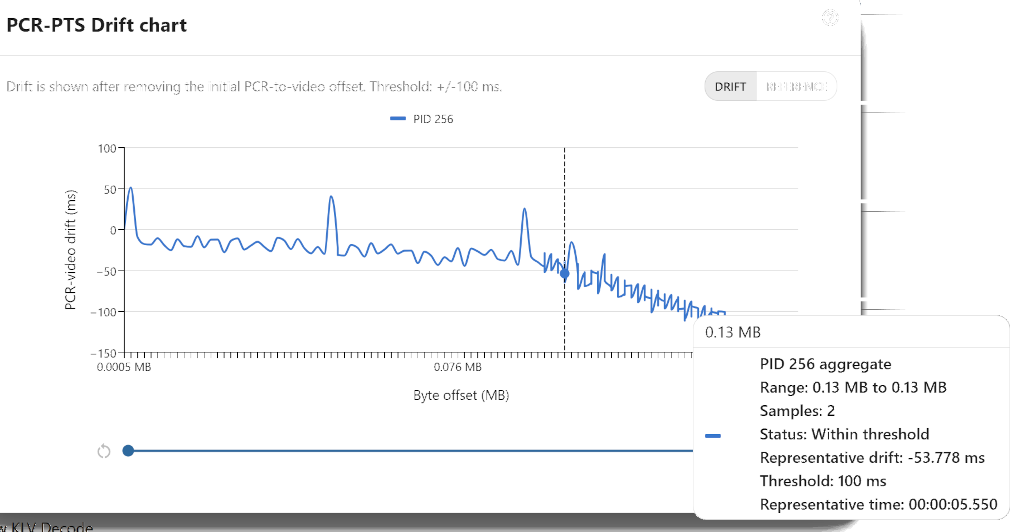
In Drift view, the line starts near zero after the initial offset is removed, then trends downward over the file. That downward slope means the video timeline is gradually falling behind the PCR-derived timeline. Small spikes are visible, but the important behavior is the steady long-term drift rather than the short-term noise.
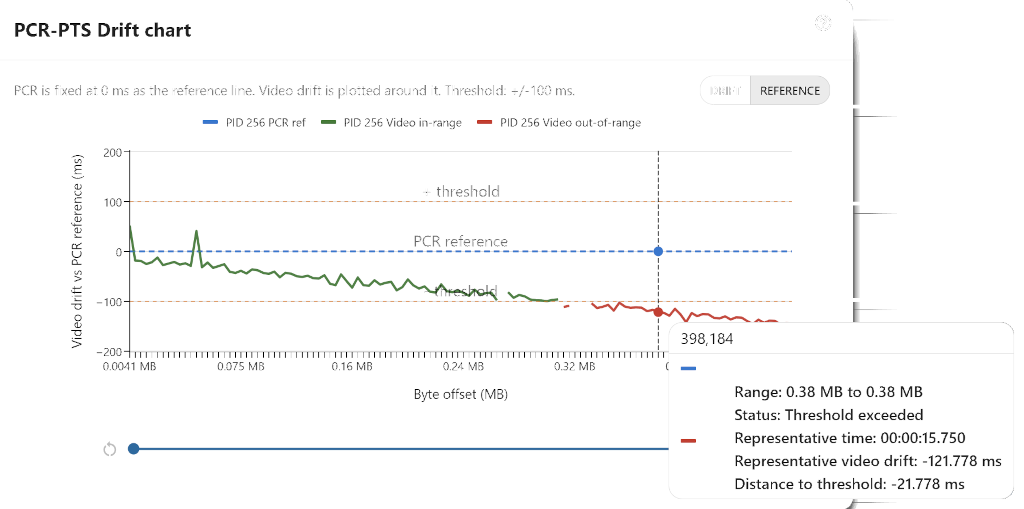
In Reference view, PCR stays fixed at 0 ms and the video drift is plotted around it. The video line moves downward until it crosses the -100 ms guide, at which point the samples turn red. That makes it easy to see both the drift direction and the point where the rule changes from in-range to failing.
Test file
- mpegts-pcr-pts-drift.ts