〰️ Capture Inter-arrival Jitter
This rule applies to MPEG-TS streams extracted from PCAP or PCAPNG files.
The inspector uses the capture timestamp of each selected UDP packet and measures the time between consecutive packet arrivals. This checks the network or capture delivery cadence of the selected MPEG-TS-over-UDP stream. It does not use PCR, PTS, or DTS as the primary clock.
Plain MPEG-TS files do not contain packet-capture timestamps, so this rule is reported as not applicable for those sources.
What this test checks
For the selected UDP stream, the validator:
- reads the per-packet timestamps preserved from the PCAP or PCAPNG file
- orders packets by capture order within that selected flow
- computes
delta = current packet capture time - previous packet capture time - compares each delta against the configured warning and failure thresholds
- keeps the capture packet index, UDP payload size, TS packet range, and TS byte offset for charting and review
This rule is about arrival regularity. A stream can have valid MPEG-TS packet structure and still fail this rule if the UDP packet arrival cadence is bursty or interrupted.
Why jitter matters
High inter-arrival jitter can indicate:
- sender pacing problems
- network buffering or congestion
- capture host scheduling delays
- dropped traffic followed by later bursts
- multicast delivery instability
For video and metadata workflows, excessive jitter can lead to decoder buffer stress, delayed metadata correlation, or inconsistent live playback behavior.
Pass criteria
The test passes when every packet-to-packet arrival delta is at or below the configured warning threshold.
Default thresholds:
- warning:
20 ms - failure:
50 ms
Warning criteria
The test reports a warning when one or more arrival deltas exceed the warning threshold but no delta exceeds the failure threshold.
With the default configuration, this means at least one inter-arrival delta is greater than 20 ms and no delta is greater than 50 ms.
Fail criteria
The test fails when one or more arrival deltas exceed the configured failure threshold.
With the default configuration, this means at least one inter-arrival delta is greater than 50 ms.
Chart
The chart plots inter-arrival delta over capture time.
Use it to identify:
- isolated spikes
- repeated jitter bursts
- long pauses followed by resumed traffic
- sustained arrival-rate instability
The x-axis is capture time relative to the first selected packet. The y-axis is the packet-to-packet arrival delta in milliseconds. Reference lines show the configured warning and failure thresholds.
Points above the warning threshold indicate jitter warnings. Points above the failure threshold indicate failed intervals.
Passing sample result

In this passing example, all packet-to-packet arrival deltas remain below the 20 ms warning threshold and far below the 50 ms failure threshold. Small variation around the baseline is expected for packet captures; it only becomes a validation concern when deltas cross the configured thresholds.
This is the expected shape for a well-paced MPEG-TS-over-UDP capture: the line stays low, there are no large isolated pauses, and there are no clusters of threshold crossings.
Failing sample result
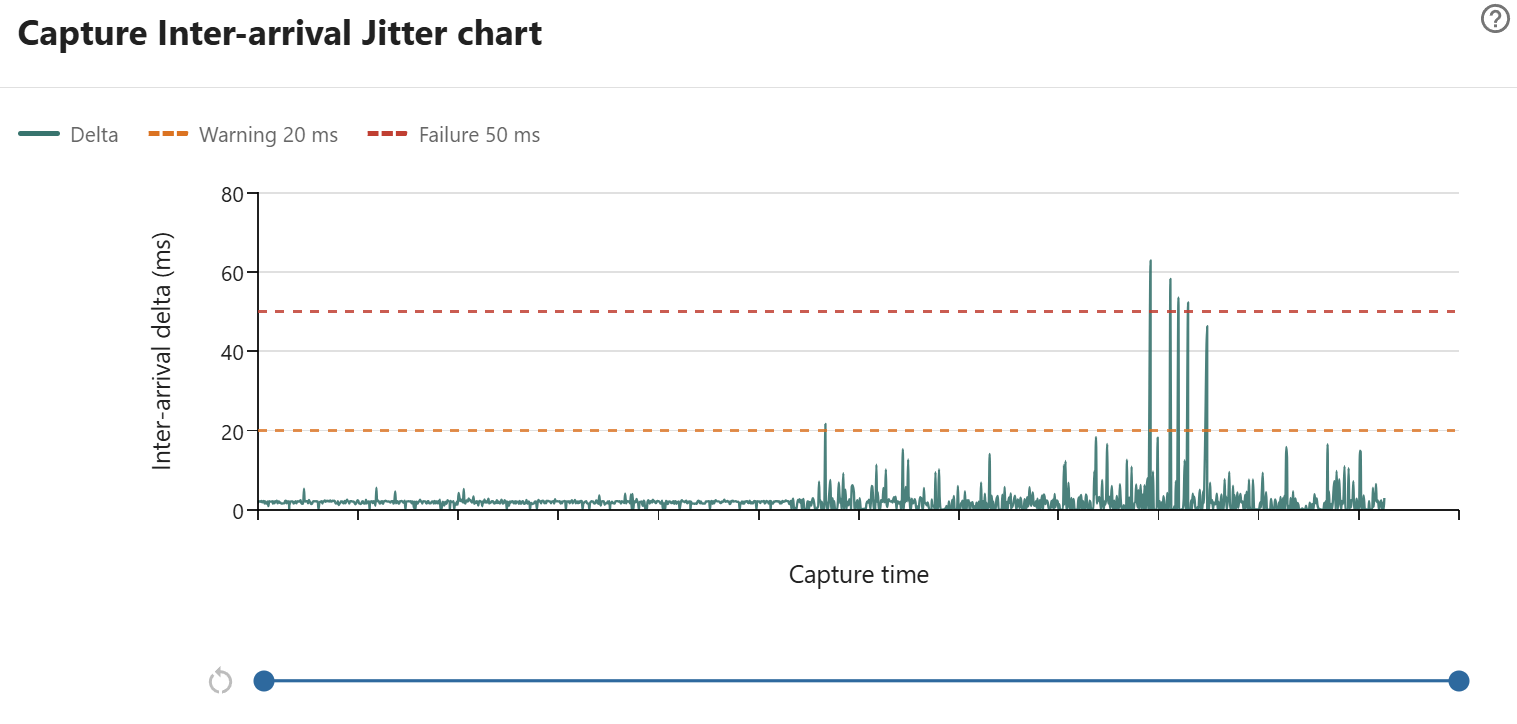
In this sample, most packet-to-packet arrival deltas stay close to the baseline and remain well below the 20 ms warning threshold. That indicates the selected UDP MPEG-TS stream is usually arriving at a steady cadence.
The right side of the chart shows a burstier section. A few deltas rise above the 20 ms warning line, and several spikes exceed the 50 ms failure line. With the default thresholds, this result fails because at least one packet arrival gap is greater than 50 ms.
This pattern usually means the capture point observed delayed delivery for short periods rather than a constant clock-rate drift. It may be caused by sender pacing bursts, network buffering, receiver scheduling, or capture host timestamp delays. Use the range slider to zoom into the spike cluster, then compare the same time range with Capture Gap Detection and MPEG-TS continuity-counter results to determine whether the jitter coincides with actual packet loss.
How to investigate failures
When this rule fails:
- check whether the spikes are isolated or periodic
- compare the capture host load during the capture
- check multicast routing, switch counters, and receiver drops
- compare the same stream captured closer to the sender
- review MPEG-TS continuity-counter errors to see whether jitter coincides with packet loss
If the stream was captured on a busy host, validate with another capture point before concluding that the sender is pacing incorrectly.