🕳️ Capture Gap Detection
This rule applies to MPEG-TS streams extracted from PCAP or PCAPNG files.
The inspector uses preserved UDP packet capture timestamps to detect long missing-arrival gaps in the selected MPEG-TS-over-UDP flow. Plain MPEG-TS files do not contain capture timestamps, so this rule is reported as not applicable for those sources.
What this test checks
For the selected UDP stream, the validator:
- reads the preserved capture timestamp for each selected UDP packet
- computes the arrival delta between consecutive packets
- compares each delta with the configured gap threshold
- reports how many gaps exceeded that threshold
- keeps the capture packet index, TS packet range, and TS byte offset so the gap can be located in the extracted stream
This rule is stricter and simpler than the jitter rule. It does not distinguish warning and failure bands. It looks for intervals large enough to be treated as probable traffic gaps or major sender stalls.
Why gaps matter
Long capture-arrival gaps can indicate:
- missing UDP packets
- sender interruption
- multicast routing interruption
- receiver-side packet drops
- capture loss
- network or host buffering that hides continuous transport delivery
For STANAG and KLV inspection, long arrival gaps can also explain missing metadata intervals, discontinuity-counter errors, PCR timing irregularity, or playback stalls.
Pass criteria
The test passes when no consecutive selected UDP packet arrival delta exceeds the configured threshold.
Default threshold:
- failure:
250 ms
Fail criteria
The test fails when one or more selected UDP packet arrival deltas exceed the configured threshold.
With the default configuration, any selected-stream UDP inter-arrival delta greater than 250 ms is reported as a capture gap.
Chart
The rule uses the capture inter-arrival timing chart.
Use the chart to identify:
- the exact capture-time position of each gap
- the gap duration in milliseconds
- whether gaps occur once, periodically, or in clusters
- whether a gap aligns with other MPEG-TS validation failures
The chart x-axis is capture time relative to the first selected packet. The y-axis is the inter-arrival delta in milliseconds. Gaps appear as large spikes above the configured threshold.
Passing sample result

In this passing example, packet-to-packet arrival deltas vary slightly but stay well below the 250 ms gap threshold. The stream may still have normal network timing variation, but there is no long missing-arrival interval large enough to be treated as a capture gap.
This is the expected shape for a capture with continuous delivery: no isolated tall spikes and no repeated long pauses across the selected stream.
Failing sample result
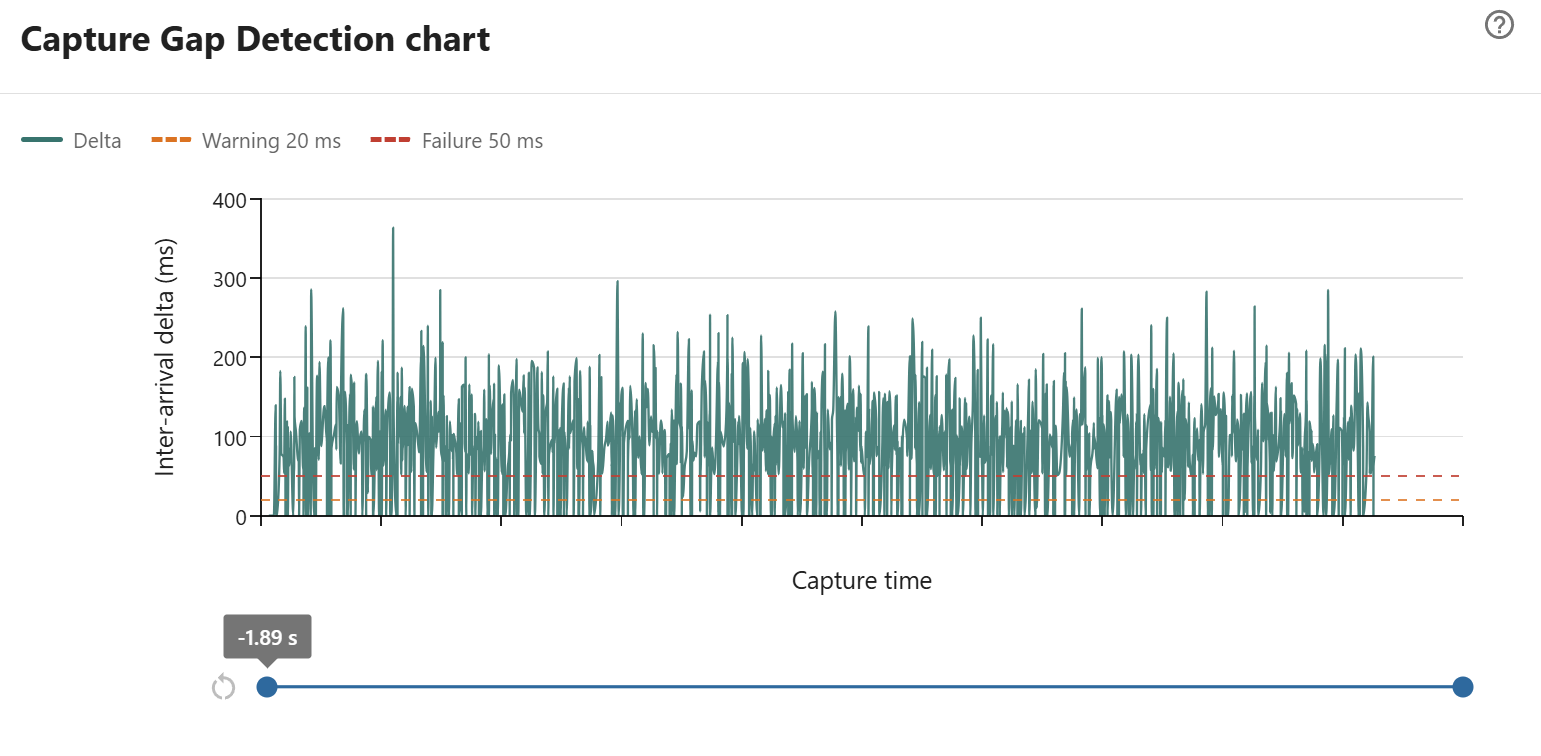
In this sample, the selected UDP stream has repeated packet-to-packet arrival deltas well above the normal low-millisecond baseline. Many spikes exceed 100 ms, and several reach roughly 250 ms to 360 ms.
With the default gap threshold of 250 ms, this result fails because at least one consecutive-packet arrival delta is greater than the configured gap limit. The repeated spike pattern means the issue is not a single isolated pause; the capture point is seeing recurring long arrival intervals throughout the selected range.
Use the range slider to zoom into the largest spikes and check the corresponding TS packet ranges. If the same locations also show MPEG-TS continuity-counter errors, the gaps likely include actual packet loss. If continuity remains clean, the pattern may indicate sender pacing stalls, buffering, or capture timestamp irregularity rather than missing transport packets.
How to investigate failures
When this rule fails:
- inspect the capture around the first reported gap
- check whether continuity-counter errors appear at the same TS packet range
- verify whether PCR or PTS timing also jumps near the gap
- compare packet counts at sender, switch, and receiver if available
- capture again closer to the source to separate sender stalls from network loss
If the gap appears only in one capture point, treat the capture path or receiver host as a likely contributor.